
Not in the US?
Click here for International Products



aev-version="3.00.16"end-identifier
Downloads
ARM EventView (v3.0)
RAC-1600
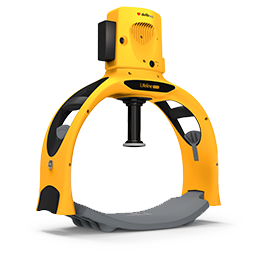
ARM EventView is a PC-based software application that allows users of the Defibtech RMU-1000 and RMU-2000 Automated Chest Compression (ACC) Systems to connect the ACC’s Compression Module via USB (both models) or via Bluetooth® (RMU-2000 only) to retrieve configuration data and log files, as well as generate event summary reports using this retrieved information. Additionally, the user can set the name of or time on the ACC device via USB connection.
Setup Instructions
Click on "Download Software" below to begin downloading the application. The installation wizard will guide you through the rest of the setup. Depending on your operating system, you may be prompted to restart your computer.
Running the Application
After installation, there are two ways to start the application:
- In the start menu, click the ARM EventView icon
- On the desktop, double-click the ARM EventView shortcut icon
Software Instructions
Operating Systems
- Windows 10 (32- and 64-bit)
- Windows 11
Although this software may run on earlier versions of Windows, it has not been certified to do so as of this release.
Hardware Requirements
- Powered Compression Module from a Defibtech RMU-1000 or RMU-2000 Automated Chest Compression System
- PC with Bluetooth capability (for wireless connection)
- USB-A to Mini-B cable (for wired connection)
Support
If you have questions or comments pertaining to this software, please contact Defibtech via email at techsupport@defibtech.com. Your comments are appreciated and will help us to create a better product for our customers in future releases.
As part of Defibtech's on-going regulatory compliance activities, event data shared with Defibtech may be used by Defibtech to fulfill regulatory obligations. Any identifying personal data or health information received is considered confidential within Defibtech and will not be used for any other purpose. Please contact Defibtech at techsupport@defibtech.com should there be any further questions.

DefibView (v2.007)
DAC-600
DefibView enables event review for Defibtech AEDs. Event Review allows medical oversight personnel to reconstruct the sequence of events for a given emergency and the data presented is adequate for this purpose. Not for Diagnostic Purposes.
Setup Instructions
Click on "Click to download" to begin downloading the software. The installation wizard will guide you through the rest of the setup. Depending on your operating system, you may be prompted to restart your computer.
Note: If you have previously installed DefibView, you may be prompted to uninstall the old version. Follow the on screen instructions. Once installation has completed, please check the installation folder for the updated exe and chm files. If the old versions are still there, you will be required to delete them and run the installer again.
Operating Systems
- Windows 7
- Windows 10
Although the application may run on earlier versions of Windows, it has not been certified to do so as of this release.
Running the Program
After installation, there are two ways to start the program:
- In the Start Menu, find the Defibtech Folder, and click the DefibView Icon
- On the Desktop, find the Defibtech Folder and doubleclick the DefibView Icon
Program Support
Questions or comments on this software should be directed to techsupport@defibtech.com. Your comments are appreciated and will help us to create a better product for our customers in future releases.
As part of Defibtech's on-going regulatory compliance activities, event data shared with Defibtech may be used by Defibtech to fulfill regulatory obligations. Any identifying personal data or health information received is considered confidential within Defibtech and will not be used for any other purpose. Please contact Defibtech at techsupport@defibtech.com should there be any further questions.